Sherlocks Partner API
For ITSM, MSP and AIOps platforms that send their clients' tickets to Sherlocks for investigation. This guide covers onboarding each client, the API you call, and how results come back to you, by signed callback or by polling.
How it works
- You send a ticket. Sherlocks investigates it and returns an
investigation_id. - You get progress and the result by callback, by polling, or both.
- You answer Sherlocks' questions, or ask your own, with a message on the ticket.
- For a remediation option, you can ask for a step-by-step plan.
Becoming a partner is a one-time setup done with the Sherlocks team. Once you are a partner, you onboard each of your clients as described below. Interested in partnering? Get in touch.
Credentials
All of these are exchanged over a secure channel agreed with the Sherlocks team. Never send them by plain email or chat.
What Sherlocks gives you
| Item | Scope | Notes |
|---|---|---|
| Platform URL | Once | https://platform.sherlocks.ai/ Where clients sign up and see their investigations. |
| API base URL | Once | https://api-service.sherlocks.ai |
| Partner ID | Once | A short name for your platform, for example acme-itsm. It is the {partner_id} part of every API path, for example /v1/integrations/{partner_id}/investigations. It goes in the URL, not as a separate value. |
| Client API key | One per client | Starts with sk_live_. Sherlocks shows it once and stores only a hash, so keep it in your secret store. If it is lost or leaked, ask for a new one; the old key stops working immediately. Every client uses the same API. Only the key differs, and it tells Sherlocks which client a call is for. |
What you give Sherlocks, for each client
| Item | Required | Notes |
|---|---|---|
| Client's Sherlocks account | Yes | The Tenant ID the client uses with Sherlocks (onboarding step 1). |
| Your client ID | Yes | Your own ID for this client. Unique across your clients. |
| Callback URL | No | An https:// endpoint where Sherlocks posts callbacks for this client. Without one, you poll the investigation instead (see Callbacks or polling). |
| Signing secret | With a callback URL | At least 32 characters. Sherlocks signs every callback with it, so you can check that a callback came from Sherlocks before you write anything to a ticket. Without a signature, anyone who finds the callback URL could post a fake result. Not needed if you only poll. See Verifying a callback. |
| Auth header name and value | No | For example X-Partner-Token. If given, Sherlocks sends it on every callback. The name can't be Content-Type or start with X-Sherlocks-. |
Onboarding a client
Steps 1 to 4 happen on the Sherlocks platform at platform.sherlocks.ai, done by the client or by you on the client's behalf.
- Create the client's workspace. Open platform.sherlocks.ai/signup and fill in Company, Tenant ID, name, work email and password, then click Create workspace. The Tenant ID is the client's Sherlocks account name; it can't be changed later.
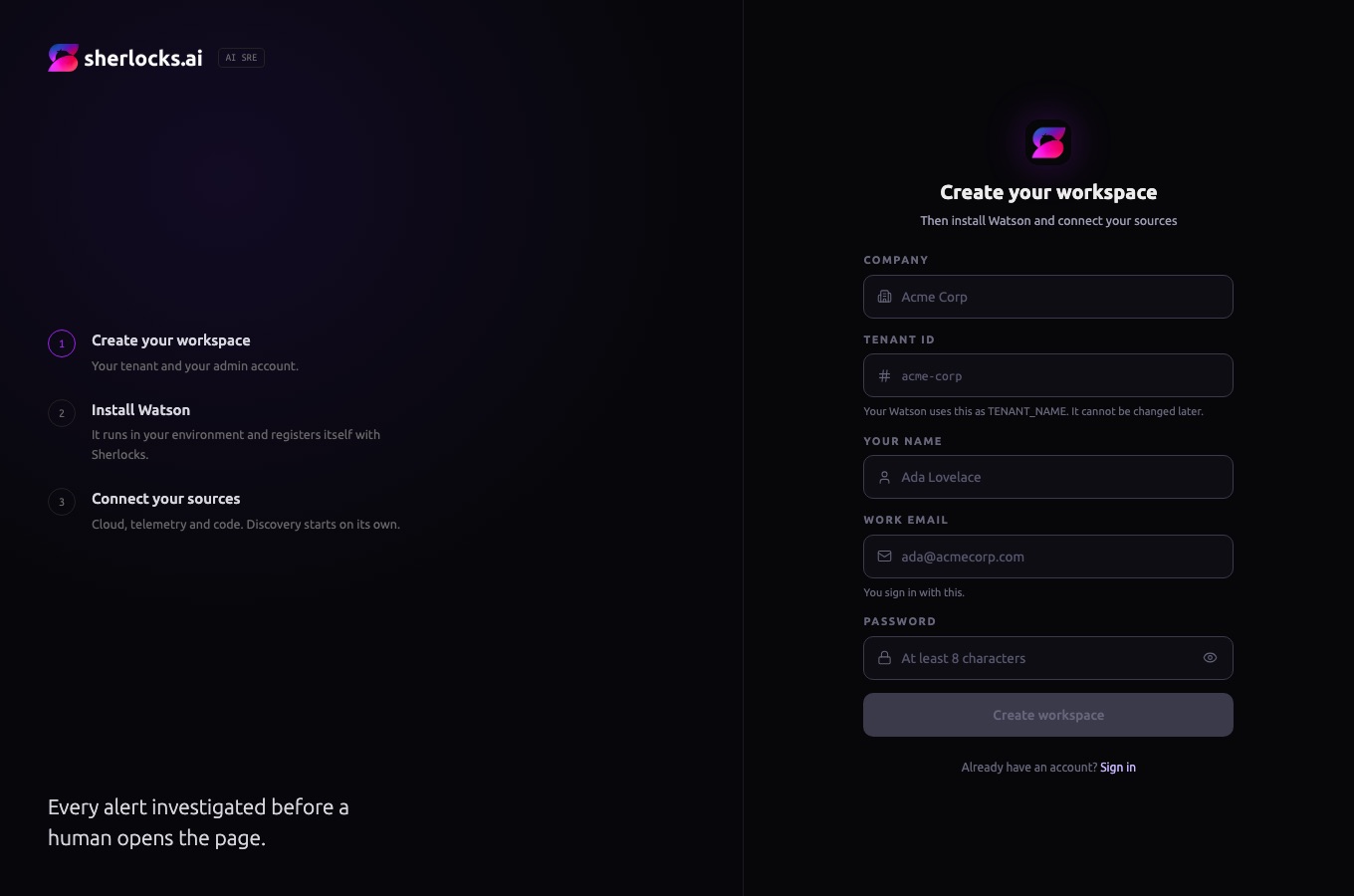
Sign-up page. The left side shows the three setup stages. - Install Watson. After sign-up, the platform opens the onboarding page. Follow its install steps (Docker or Kubernetes) to run Watson in the client's environment. Watson registers itself with Sherlocks when it starts.
- Connect the client's sources. On the same page, connect the cloud account, telemetry (for example Datadog, Grafana, CloudWatch) and code repositories. Investigations use these, so connect everything the client's alerts relate to.
- Wait for the infrastructure sync. Sherlocks then discovers the client's infrastructure on its own; the onboarding page shows the scan while it runs. Send tickets for this client only after the sync is done and the page says "Sherlocks is fully online". Before that, Sherlocks can't tell which service an alert is about, so investigations stall or ask clarifying questions.
- Send the client's details from the table above to Sherlocks over the secure channel. Use the Tenant ID from step 1 as the client's Sherlocks account. This can happen while the sync runs.
- Sherlocks links the client and returns its API key over the same channel.
- Store the key against that client. Every API call for this client uses this key.
- Send a test ticket (create an investigation). With a callback URL, check the first callback arrives and its signature verifies (verifying callbacks). Without one, poll until the status changes.
- Go live. Send the client's real tickets.
Testing with a demo tenant
Before a real client goes live, test the API flow on a Sherlocks demo tenant. Sherlocks links the demo tenant to your partner account and tells you its name. The test tickets do not need a real incident: what is being tested is that a ticket raised in your platform reaches the create an investigation call and the result comes back.
- Create a test account in your platform and raise all test tickets there. Naming it after the demo tenant keeps the two easy to match.
- Send your client ID for that test account over the secure channel. Callback details can come later, in step 6.
- Sherlocks sends the API key for the demo tenant over the same channel. Store it and use it on every call for this tenant.
- Raise a test ticket. Your integration creates an investigation with that key and gets back an
investigation_id. - Poll the status until it is
completed,failedorcancelled(see Callbacks or polling). - Turn on callbacks when you are ready. Send a callback URL, a signing secret of at least 32 characters, and an optional auth header. The callback URL is an endpoint you host to receive Sherlocks events. It checks the signature (verifying callbacks) and then updates the ticket. An existing ticket update API is unlikely to work as it is, because Sherlocks posts its own event format and signature headers.
- Answer any question. If Sherlocks asks a clarifying question, answer it with a message before it expires.
Authentication
Send the client's API key as a bearer token on every call. The key decides which client the call is for, so the client never appears in the path.
Authorization: Bearer sk_live_...A missing or wrong key returns 401. So does a key used with another partner ID, or for a client or partner that has been suspended.
API reference
All paths below are relative to https://api-service.sherlocks.ai/v1/integrations/{partner_id}. Every response is JSON in the same envelope. Success: {"success": true, "status": 202, "data": {…}}. Error: {"success": false, "status": 400, "error": {"code": "bad_request", "message": "…"}}.
Sends a ticket and starts an investigation. Returns 202 with a new investigation. Sending the same ticket again while its investigation is still open returns 200 with the same investigation, so retries are safe.
| Field | Required | Notes |
|---|---|---|
external_ticket_id | Yes | Ticket ID in the client's ITSM. |
source_system | Yes | servicenow, jira, freshworks, bmc or other. |
source_instance_id | Yes | The ITSM instance. Together with external_ticket_id it identifies the ticket. |
title, description | One of them | The alert or ticket text. More detail gives a better investigation. |
priority | No | For example P1. |
created_at | No | RFC 3339. When the problem started; the investigation looks at that time window. |
entities | No | Affected things, each {"type", "name"}, for example a service or host. |
ticket_url | No | Link back to the ticket. |
metadata | No | String key/value pairs. Returned unchanged on every callback. |
curl -X POST 'https://api-service.sherlocks.ai/v1/integrations/{partner_id}/investigations' \
  -H 'Authorization: Bearer sk_live_...' \
  -H 'Content-Type: application/json' \
  -d '{
    "external_ticket_id": "INC0012345",
    "source_system": "servicenow",
    "source_instance_id": "acme-snow-prod",
    "title": "checkout-api 5xx rate above 5%",
    "description": "Error rate on checkout-api crossed 5% for 10 minutes.",
    "priority": "P1",
    "created_at": "2026-11-20T09:15:00Z",
    "entities": [{"type": "service", "name": "checkout-api"}],
    "ticket_url": "https://acme.service-now.com/incident.do?sys_id=...",
    "metadata": {"partner_conversation_id": "c_8812"}
}'{
"success": true,
"status": 202,
"data": {
"investigation_id": "inv_1830949b-a7e3-4f12-990e-c0572c5c6c6c",
"external_ticket_id": "INC0012345",
"status": "queued",
"created_at": "2026-11-20T09:15:04Z"
}
}Returns one investigation. Once it is completed, the response also carries root_cause and, when there are any, remediation options. It also lists every question with its answer:
clarifying_questions: what Sherlocks asked before investigating (at most two, one open at a time), with your answers.followup_questions: the follow-up messages you sent, with Sherlocks' answers.
curl 'https://api-service.sherlocks.ai/v1/integrations/{partner_id}/investigations/inv_1830949b-a7e3-4f12-990e-c0572c5c6c6c' \
-H 'Authorization: Bearer sk_live_...'{
"success": true,
"status": 200,
"data": {
"investigation_id": "inv_1830949b-a7e3-4f12-990e-c0572c5c6c6c",
"external_ticket_id": "INC0012345",
"status": "completed",
"investigation_url": "https://platform.sherlocks.ai/incidents/...",
"root_cause": "A config change at 09:02 lowered the DB pool size ...",
"remediation": {
"summary": "...",
"options": [
{"option_id": "opt_1", "summary": "Restore the pool size", "risk": {...}, "time_to_implement": "5m"}
]
},
"clarifying_questions": [
{
"question_id": "q_...",
"question": "Which kind of infrastructure is affected?\n- K8s (248)\n- EC2 (72)",
"answer": "K8s",
"answered_at": "2026-11-20T09:15:40Z",
"expires_at": "2026-11-20T09:45:20Z"
}
],
"followup_questions": [
{
"question_id": "msg_...",
"question": "Was there a deploy just before the errors started?",
"answer": "Yes, checkout-api v2.3 went out at 09:01 ...",
"answered_at": "2026-11-20T09:31:02Z"
}
],
"created_at": "2026-11-20T09:15:04Z"
}
}The same response, looked up by ticket instead of by ID. Returns the ticket's latest investigation.
curl 'https://api-service.sherlocks.ai/v1/integrations/{partner_id}/investigations?external_ticket_id=INC0012345&source_instance_id=acme-snow-prod' \
-H 'Authorization: Bearer sk_live_...'A comment on the ticket. While a clarifying question is open it is taken as the answer; after the result it is a follow-up question. Its message_id is the question_id of the answer, which comes as a reply callback and in followup_questions. Returns 202 with type set to answer or followup. Returns 409 if the investigation hasn't started yet; send it again shortly.
curl -X POST 'https://api-service.sherlocks.ai/v1/integrations/{partner_id}/messages' \
  -H 'Authorization: Bearer sk_live_...' \
  -H 'Content-Type: application/json' \
  -d '{
    "external_ticket_id": "INC0012345",
    "source_instance_id": "acme-snow-prod",
    "text": "Was there a deploy just before the errors started?",
    "author": {"name": "Priya (L2 support)"}
}'{"success": true, "status": 202, "data": {"message_id": "...", "investigation_id": "inv_...", "type": "followup"}}The remediation options for an investigation, each with its risk, reversibility, intrusiveness and time to implement, plus a plan once one has been made.
curl 'https://api-service.sherlocks.ai/v1/integrations/{partner_id}/investigations/inv_.../remediation' \
-H 'Authorization: Bearer sk_live_...'Asks for a step-by-step plan for one option. Returns 202 with a plan_id; the plan arrives later as a remediation_plan callback, and on the remediation GET. No body.
curl -X POST 'https://api-service.sherlocks.ai/v1/integrations/{partner_id}/investigations/inv_.../remediation/options/opt_1/plan' \
-H 'Authorization: Bearer sk_live_...'Callbacks or polling
A callback URL is optional. Without one, Sherlocks sends nothing to you, and you poll instead:
- Poll
GET …/investigations/{investigation_id}(or by ticket) every 30 to 60 seconds untilstatusiscompleted,failedorcancelled. - When it is
completed, the response carriesroot_causeand anyremediationoptions. PollGET …/remediationfor a requested plan. - When
statusisawaiting_input, Sherlocks is waiting for an answer: the last entry inclarifying_questionshas noansweryet. Answer it with a message before itsexpires_at. - After a follow-up message, poll until its entry in
followup_questionshas ananswer.
With a callback URL, polling still works at any time and is a good fallback if a callback is missed.
Callbacks
When the client has a callback URL, Sherlocks sends each event as a POST with a JSON body to it.
{
  "event_id": "status_running_ec5029fb-...",
  "event_type": "status",
  "investigation_id": "inv_1830949b-a7e3-4f12-990e-c0572c5c6c6c",
  "external_ticket_id": "INC0012345",
  "status": "running",
  "investigation_url": "https://platform.sherlocks.ai/incidents/...",
  "occurred_at": "2026-11-20T09:16:26Z",
  "metadata": {"partner_conversation_id": "c_8812"},
  "data": {"reason": "investigation_started"}
}| event_type | When | data |
|---|---|---|
status | The investigation starts, or ends without a result | reason: investigation_started, no_answer, not_investigated, investigation_disabled, cancelled_by_user or failed |
question | Sherlocks needs clarification before it can investigate | question_id, question (the whole question as text, with any suggested answers), expires_at. Answer with a message before expires_at. |
result | The investigation finishes; a deeper round can send another | root_cause, or note when no root cause was found |
reply | The answer to a follow-up message | question_id (the message_id you got back), answer, failed |
remediation_options | Remediation options are ready | summary, options, text_markdown |
remediation_plan | A requested plan is ready | option_id, plan, text_markdown |
Verifying a callback
- If you gave an auth header, check it matches.
- Read
X-Sherlocks-Timestamp(Unix seconds) and reject it if it is more than 5 minutes from now. - Compute HMAC-SHA256 of
<timestamp>.<raw request body>with the client's signing secret, as lowercase hex. - Compare it with
X-Sherlocks-Signatureusing a constant-time compare.
Sign the raw bytes exactly as received. Parsing the JSON and serializing it again changes the bytes and the signature will not match.
import hashlib, hmac, time

def verify(headers, raw_body: bytes, signing_secret: str) -> bool:
    timestamp = headers.get("X-Sherlocks-Timestamp", "")
    if not timestamp.isdigit() or abs(time.time() - int(timestamp)) > 300:
        return False
    expected = hmac.new(
        signing_secret.encode(),
        timestamp.encode() + b"." + raw_body,
        hashlib.sha256,
    ).hexdigest()
return hmac.compare_digest(expected, headers.get("X-Sherlocks-Signature", ""))import crypto from "node:crypto";
export function verify(headers, rawBody /* Buffer */, signingSecret) {
const timestamp = headers["x-sherlocks-timestamp"] ?? "";
if (!/^\d+$/.test(timestamp) || Math.abs(Date.now() / 1000 - Number(timestamp)) > 300) {
return false;
}
const expected = crypto
.createHmac("sha256", signingSecret)
.update(Buffer.concat([Buffer.from(timestamp + "."), rawBody]))
.digest("hex");
const given = String(headers["x-sherlocks-signature"] ?? "");
return given.length === expected.length &&
crypto.timingSafeEqual(Buffer.from(expected), Buffer.from(given));
}Delivery and retries
- Answer with any
2xxwithin 10 seconds. Do slow work after you answer. - Timeouts,
5xx,408and429are retried, up to 6 attempts in about 30 minutes, then dropped. Polling still returns the latest state. - Other
4xxanswers are not retried. - The same event can arrive more than once. Use
event_idto ignore duplicates.
Statuses and errors
Investigation status
| Status | Meaning |
|---|---|
queued | Ticket received, investigation not started yet. |
awaiting_input | Waiting for the answer to a question. |
running | Investigation in progress. |
paused | Investigation paused. |
completed | Finished. root_cause is set. |
cancelled | Stopped before it finished, for example cancelled on the Sherlocks platform. A status callback with reason cancelled_by_user is sent. |
failed | Could not complete. The ticket can be sent again. |
HTTP errors
| Status | error.code | When |
|---|---|---|
400 | bad_request | A required field is missing or invalid. message says which. |
401 | unauthorized | Missing or wrong API key. |
404 | not_found | No such investigation, ticket or remediation option for this client. |
409 | conflict | Too early: the investigation hasn't started, or remediation has stopped. Try again later. |
422 | unprocessable | The client's Watson hasn't registered yet (onboarding step 2). Finish the install, then send the ticket again. |
5xx | internal_error, upstream_error | A problem on the Sherlocks side. Retry with backoff; resending a ticket is safe. |